Fantastic Presentation Template: Design & Utility
In the fast-paced world of professional communication, the difference between a forgettable meeting and a compelling narrative often lies in visual execution. The Presentation Template - Fantastic addresses this gap by providing a comprehensive design framework that balances aesthetic appeal with functional versatility. Rather than forcing users into a rigid niche, this template system is engineered to adapt across multiple disciplines, from automotive showcases to creative agency portfolios. For professionals aged 20 to 50 who need to convey complex information quickly, having a reliable, pre-structured visual foundation is not just a convenience; it is a strategic asset for maintaining brand consistency and audience engagement.
Core Architecture and Customization Capabilities
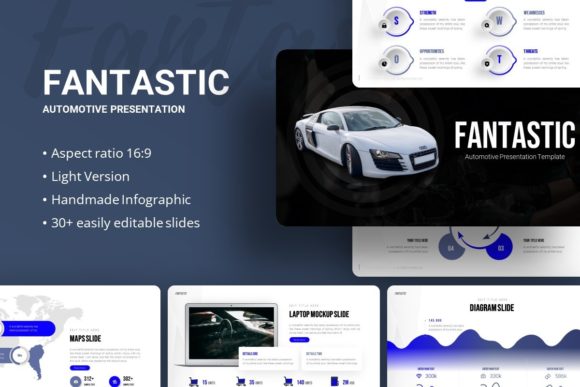
The primary strength of the Fantastic template lies in its technical construction. It includes 35 distinct slides per template, offering enough variety to handle diverse content types without becoming bloated or repetitive. Crucially, these slides are built upon Master Slides within PowerPoint. This architectural choice is significant for efficiency. When you adjust a font style, color palette, or logo placement on the master slide, those changes propagate instantly across the entire deck. This eliminates the tedious process of formatting individual slides and ensures that your presentation maintains pixel-perfect consistency from the title screen to the closing remarks.
Beyond structural integrity, the template prioritizes user-friendly editing. All graphics are fully resizable and editable vectors, meaning they remain crisp whether projected on a laptop screen or a conference hall display. The inclusion of drag-and-drop picture placeholders further streamlines the workflow. Instead of wrestling with image cropping tools or alignment guides, users can simply drop their photography or product shots directly into designated frames. This feature is particularly valuable for freelancers and marketers who frequently update decks with new case studies or seasonal campaigns, as it reduces production time while preserving professional design standards.
Handcrafted Infographics for Data Storytelling
Data visualization is often where presentations fail. Generic charts can look sterile, while custom illustrations require expensive software skills. The Fantastic template bridges this divide with handcrafted infographics designed natively in PowerPoint. These are not static images imported from external sources; they are native shapes and text boxes that users can modify directly. Whether you are presenting quarterly financial growth, market share analysis, or project timelines, these infographics allow you to tailor the data representation to your specific narrative. This capability transforms abstract numbers into digestible visual stories, enhancing retention and comprehension for stakeholders who may not have technical expertise.
Versatile Applications Across Industries
While the "Automotive" designation might suggest a narrow focus, the design language of the Fantastic template is intentionally broad. Its clean lines and modern typography make it suitable for a wide spectrum of professional environments. Understanding how to leverage this versatility is key to maximizing return on investment.
- Creative Agencies and Portfolios: The minimalist layout allows creative work to take center stage. Photographers and designers can use the high-quality image placeholders to create gallery-style slides that showcase work without distracting borders or heavy textures.
- Corporate and Business Profiles: For established companies, the template provides a polished, corporate-ready structure. The master slide system ensures that brand guidelines are strictly adhered to, which is essential for internal training, investor relations, and B2B sales pitches.
- Startups and Pitch Decks: Entrepreneurs often struggle to translate vision into visuals. The included infographic slides are ideal for explaining business models, market opportunities, and competitive advantages. The professional aesthetic helps build credibility with investors who judge startups partly on their ability to communicate clearly.
- Educational and Personal Use: Educators and students benefit from the organized layout for lectures or thesis defenses. Similarly, job seekers can repurpose the portfolio sections to create interactive resumes that stand out in digital submissions.
Enhancing Communication Efficiency
Time is the most scarce resource for modern professionals. Creating a high-impact presentation from scratch can consume dozens of hours. By utilizing the Presentation Template - Fantastic, users reclaim this time for content refinement and rehearsal. The template handles the heavy lifting of layout design, color theory, and typographic hierarchy. This shift in focus—from designing slides to crafting messages—directly improves communication outcomes. When you are not stressing over alignment issues, you can spend more energy ensuring your value proposition is clear and your call to action is persuasive.
Furthermore, the template supports better cognitive processing for the audience. Consistent visual cues help viewers navigate information. When headers, bullet points, and data visualizations follow a predictable pattern established by the master slides, the audience spends less mental energy decoding the slide structure and more energy absorbing the actual content. This subtle UX improvement can be the deciding factor in keeping a room engaged during a long pitch or detailed report.
Practical Considerations for Implementation
To get the most out of this resource, users should approach implementation with a few practical considerations in mind. First, always review the included documentation file before starting. While the template is intuitive, understanding the specific organization of layers and master slides will prevent frustration later. Second, remember that all images shown in the preview demo are for illustrative purposes only and are not included in the download. You must supply your own high-resolution assets. Using low-quality or watermarked stock photos will undermine the premium feel of the template, so budget time for sourcing appropriate imagery.
Additionally, consider the vector icon set included in the files. These icons are designed to match the template’s stroke weight and style. Mixing them with mismatched clip art can create visual dissonance. Stick to the provided icon library or source additional icons that perfectly match the existing aesthetic to maintain that handcrafted, cohesive look. Finally, while the template is fully editable, resist the urge to over-customize. The design has been balanced by professionals; drastic alterations to spacing or color contrast can inadvertently reduce readability. Make adjustments that serve your content, but respect the underlying grid system that makes the template effective.
Deliverables and File Management
When you acquire the Presentation Template - Fantastic, you receive a complete package designed for immediate deployment. The core deliverable is the PowerPoint .PPTX file, compatible with modern versions of Microsoft Office. Alongside this, the vector icon file provides scalable graphical elements, and the documentation serves as your user manual. Organizing these assets in a dedicated project folder is recommended to prevent broken links or missing resources during future edits. By treating this template as a living design system rather than a disposable file, you can build a library of branded slides that accelerates every future presentation project.