Presentation Template - Next: Elevate Your Visual Story
In a digital landscape saturated with generic slide decks, standing out requires more than just good content; it demands a visual framework that amplifies your message without overshadowing it. The Presentation Template - Next was designed specifically to bridge the gap between complex data and compelling storytelling. Whether you are preparing a high-stakes investor pitch or showcasing a personal photography portfolio, this template serves as a versatile foundation for modern communication. It moves beyond the standard corporate aesthetic, offering a clean, forward-thinking design language that resonates with contemporary audiences across multiple industries.
Core Architecture and Design Flexibility
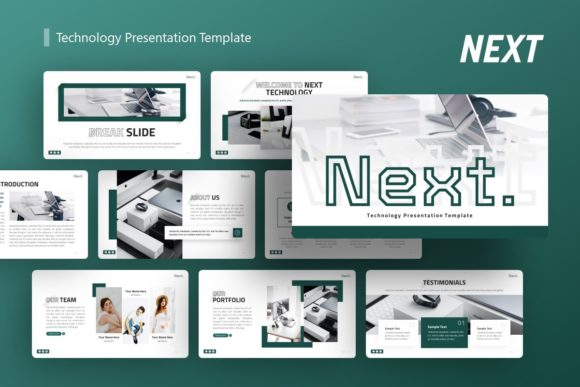
The structural integrity of any presentation tool lies in its ease of modification. Next is built entirely on Master Slides, which is a critical distinction for professionals who value efficiency. Rather than formatting individual slides one by one, changes made to the master layout propagate instantly across the entire deck. This architecture ensures consistency in typography, color palettes, and spacing, significantly reducing the time spent on manual adjustments. With 36 unique slides included in each template variation, users have access to a comprehensive library of layouts ranging from title screens and team introductions to data visualization and closing arguments.
Visual assets within the Presentation Template - Next are fully vector-based and resizable. This means you can scale infographics and illustrations to fit any screen ratio or print format without experiencing pixelation or quality loss. For creative agencies and designers, this level of control is non-negotiable. The handcrafted infographics included in the package are not merely decorative; they are functional tools designed to simplify complex information. Because every graphic element is editable directly within PowerPoint, you can adapt charts, timelines, and process diagrams to reflect your specific brand identity without needing external software like Adobe Illustrator.
Streamlining Workflow with Drag-and-Drop Functionality
Productivity often hinges on how quickly you can populate a template with your own content. Next addresses this through intuitive picture placeholders that utilize drag-and-drop functionality. This feature eliminates the tedious process of cropping, masking, and aligning images manually. You simply drag your asset into the designated frame, and the template automatically adjusts the crop and sizing to maintain the intended composition. This is particularly valuable for photographers and portfolio builders who need to swap out imagery frequently while maintaining a cohesive visual rhythm throughout the presentation.
Practical Applications Across Diverse Sectors
Versatility is the defining characteristic of the Introducing Next Technology Presentation. While many templates are niche-specific, this system adapts to various professional contexts through modular design elements. Understanding how to leverage these features for specific use cases can maximize the return on your investment.
- Creative Agencies and Portfolios: For visual professionals, the template’s minimalist aesthetic allows artwork and case studies to take center stage. The ample whitespace and modern typography create a gallery-like experience that feels curated rather than cluttered. Use the full-bleed image slides for impact and the grid layouts for project overviews.
- Startups and Pitch Decks: Investors review hundreds of decks annually. Next provides structured slides for problem-solution narratives, market analysis, and financial projections that look polished and credible. The handcrafted infographics help visualize traction and growth metrics clearly, making abstract numbers tangible for stakeholders.
- Corporate and Business Profiles: Established companies can utilize the template to refresh internal communications or client-facing proposals. The professional tone of the design conveys stability and innovation simultaneously. Master slide integration ensures that brand guidelines are strictly adhered to, even when multiple team members contribute to a single deck.
- Educators and Trainers: Engagement drops when slides become text-heavy. The varied layout options in Next allow educators to break up lectures with visual aids, comparison charts, and interactive discussion prompts. The clean design reduces cognitive load, helping students focus on key learning objectives.
Enhancing Communication Through Visual Hierarchy
Effective presentation design is ultimately about guiding the viewer’s attention. The Presentation Template - Next employs strong visual hierarchy principles to ensure your most important points land effectively. Headlines are distinct from body copy, and accent colors are used strategically to highlight key data points or calls to action. This intentional design prevents the "wall of text" syndrome that plagues amateur presentations. By using pre-designed layouts that already respect these design rules, you communicate professionalism and clarity subconsciously, building trust with your audience before you even speak.
Technical Considerations and Implementation Best Practices
Before integrating this template into your workflow, there are practical factors to consider to ensure a smooth experience. The package includes a .PPTX file, documentation, and vector icons, providing everything needed for immediate deployment. However, users should note that all images shown in the demo preview are for illustrative purposes only and are not included in the download. This is standard industry practice, but it means you must have your own high-quality assets ready to go.
When customizing the handcrafted infographics, resist the urge to overcrowd them. These elements were designed with specific negative space to remain legible at projection sizes. If you add too much text or additional graphical noise, you risk negating their effectiveness. Stick to the provided icon set where possible to maintain stylistic consistency, though the inclusion of vector icons does allow for easy swapping if your topic requires specialized symbology.
For those new to Master Slides, spending fifteen minutes reviewing the included documentation file can save hours of frustration later. Understanding which elements are locked to the master versus which are editable on the individual slide layer is crucial for efficient editing. This knowledge prevents accidental misalignments and ensures that global branding changes are applied correctly across all 36 slides.
Why Quality Assets Matter for Professional Impact
In an era where AI-generated content is becoming ubiquitous, handcrafted design elements carry a premium value. The illustrations and graphics in the Presentation Template - Next were created by human designers with an understanding of presentation flow and readability. This results in visuals that feel organic and purposeful rather than algorithmic and disjointed. When presenting to discerning clients or senior leadership, this subtle difference in quality contributes to an overall perception of competence and attention to detail.
Ultimately, selecting a presentation template is an exercise in balancing aesthetics with utility. Next succeeds because it does not force a rigid style upon the user but rather provides a robust, flexible system for visual communication. Whether you are a freelancer pitching a new retainer, a startup founder seeking seed funding, or a marketing director reporting quarterly results, this template offers the structural support needed to deliver your message with confidence. By leveraging its master slide architecture, vector scalability, and diverse layout options, you transform the daunting task of deck creation into a streamlined, creative process that yields professional results consistently.