Evaluating the Citizen Life Power Point Template for Professional Presentations
Selecting the right presentation asset requires balancing aesthetic appeal with functional utility. For professionals managing corporate communications, insurance portfolios, or community outreach programs, the Citizen Life Power Point Template offers a structured approach to visual storytelling. This resource is designed specifically for users who need to convey complex information regarding lifestyle, protection, and civic responsibility without spending excessive hours on graphic design. Understanding its specific architecture, including its 150 total slides and master slide dependencies, is essential for determining if it aligns with your current workflow and branding requirements.
Structural Capacity and Content Organization
The primary differentiator of this template compared to standard business decks is its volume and segmentation. With 150 total slides distributed across five distinct color variations, the Citizen Life Power Point Template provides 30 unique slides per color scheme. This abundance serves a specific strategic purpose: it allows presenters to build multiple deck variations from a single source file without repetitive formatting.
When comparing this to generic minimalist templates that often contain only 20 to 30 slides total, the tradeoff becomes clear. Generic options offer speed but lack depth. The Citizen Life structure supports comprehensive narratives that require dedicated sections for data visualization, team introductions, and portfolio showcases. The inclusion of specific Section Break Slides facilitates better cognitive pacing for the audience, allowing speakers to transition between heavy data analysis and emotional storytelling seamlessly. For users creating annual reports or detailed policy explanations, this structural density prevents the need to purchase supplementary assets.
Handcrafted Infographics Versus Automated Charts
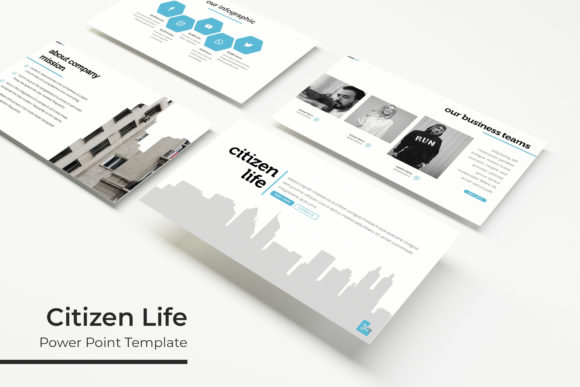
A critical evaluation point for any presentation resource is how it handles data. Many modern templates rely heavily on native PowerPoint charting tools, which are editable but often visually rigid. The Citizen Life Power Point Template utilizes handcrafted infographic slides. These are vector-based illustrations created directly within the slide environment rather than linked Excel objects.
This distinction matters for two reasons:
- Visual Consistency: Handcrafted graphics maintain pixel-perfect alignment with the template’s typography and color palette, avoiding the disjointed look that occurs when default chart styles clash with custom themes.
- Editability Tradeoffs: While these infographics are fully resizable and editable, they do not update automatically when you change a spreadsheet cell. Users must manually adjust shapes and text boxes. If your workflow requires real-time data linking from external databases, this template may introduce friction. However, for static reporting where visual polish takes precedence over dynamic data updates, this approach yields superior results.
Design Flexibility and Master Slide Architecture
Efficiency in presentation design is largely dictated by how well a template utilizes Master Slides. The Citizen Life Power Point Template is built on a robust master slide foundation, ensuring that global changes propagate correctly throughout the deck. This is particularly relevant when utilizing the five premade color options. Rather than manually recoloring individual elements, users can leverage the theme engine to switch between palettes instantly.
The template includes both standard (4:3) and widescreen (16:9) PPTX files. In an era where most displays are widescreen, the inclusion of standard format files caters to niche use cases such as printed handouts, tablet viewing, or legacy projection systems. When evaluating alternatives, verify whether they offer dual aspect ratios. Many contemporary templates have abandoned 4:3 support entirely, which can be problematic for organizations with mixed hardware environments or strict archival standards.
Image Management and Placeholder Utility
The template features resizable and editable picture placeholders designed for drag-and-drop functionality. This reduces the technical barrier for non-designers, ensuring images crop correctly without distortion. However, a vital consideration for budget planning and project timelines is licensing. All photographs used in the preview are for illustration purposes only and are not included.
This is standard industry practice, yet it significantly impacts the "ready-to-use" timeline. When comparing this template to stock-photo-bundled alternatives, consider your existing asset library. If you already possess high-quality, brand-compliant photography of citizens, communities, or office environments, this template acts as an ideal frame. If you lack imagery, you must factor in the time and cost of sourcing appropriate visuals. The placeholder system is optimized for professional photography; using low-resolution or poorly composed images will negate the benefits of the pixel-perfect layout.
Comparative Fit: When to Choose Citizen Life
Determining whether the Citizen Life Power Point Template is the correct investment involves assessing your specific content vertical against the template's inherent strengths. It is not a universal solution, and recognizing its optimal fit prevents buyer's remorse.
Ideal Use Cases
This template excels in sectors where trust, stability, and human-centric narratives are paramount. The design language balances corporate professionalism with approachable warmth, making it suitable for:
- Insurance and Financial Services: The gallery and portfolio slides are structured to showcase products or case studies without appearing overly aggressive.
- Non-Profit and Civic Organizations: The infographic capabilities allow for clear communication of impact metrics and community demographics.
- Human Resources and Internal Comms: Section breaks and clean layouts support training modules and policy updates where readability is critical.
- Healthcare and Wellness: The color variations include softer palettes appropriate for patient-facing or public health presentations.
Situations Requiring Alternatives
Conversely, there are scenarios where this template may not be the most efficient choice. Users should consider alternative resources if:
- You Require Dark Mode Exclusively: While color schemes are customizable, the base architecture appears optimized for light backgrounds. Converting 150 slides to a true dark mode may require significant manual adjustment.
- Your Content is Purely Technical: Engineering schematics or code-heavy presentations may find the lifestyle-oriented iconography and soft shapes distracting. Technical templates with grid-heavy layouts are often superior here.
- You Need Animated Transitions: This template focuses on static visual clarity. If your strategy relies on complex motion graphics or morph transitions to explain processes, you will need to build those animations from scratch.
- Budget Constraints are Extreme: Free alternatives exist, though they typically lack the 150-slide depth and master slide integrity. If you only need a 10-slide pitch deck, the full scope of Citizen Life may be unnecessary overhead.
Technical Specifications and Deliverables
For procurement teams and IT departments verifying compatibility, the technical deliverables are straightforward. The package includes five PPTX files for each aspect ratio, totaling ten editable files. A Readme First document is provided, which is crucial for accessing the free font download link. Typography plays a massive role in the template's professional appearance; failing to install the specified fonts will result in substitution errors that break the pixel-perfect alignment.
The reliance on free fonts is a practical advantage over templates requiring paid typeface licenses. This eliminates future compliance risks when sharing files externally. When comparing options, always check font licensing terms. Some premium templates use commercial fonts that legally prevent you from distributing the final PDF or PPTX to clients without additional fees. Citizen Life avoids this friction point entirely.
Making the Final Decision
The decision to adopt the Citizen Life Power Point Template should be based on a realistic assessment of your content volume and visual needs. It represents a middle-ground solution: more comprehensive than free basic themes, yet more specialized and curated than massive, generic mega-bundles. Its value proposition lies in the curation of 150 slides that speak a consistent visual language tailored to citizen-centric and service-oriented topics.
If your upcoming presentations require a blend of data-driven infographics, professional portraiture, and flexible color theming, this template provides a solid foundation. However, success depends on your willingness to work within its handcrafted framework and your ability to supply high-quality supporting imagery. By weighing these factors against your specific project requirements, you can determine if this asset will streamline your production process or if a different category of presentation tool would better serve your objectives.