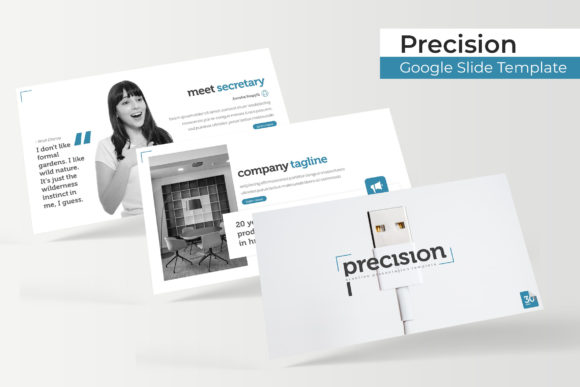
Precision Google Slide Template: A Practical Asset for Modern Presentations
Creating a cohesive visual narrative often feels like a battle against formatting tools rather than a creative process. The Precision Google Slide Template addresses this friction by offering a structured yet flexible framework designed for professionals who need to communicate complex ideas clearly. At its core, this asset is not just a collection of backgrounds; it is a comprehensive presentation system comprising 150 total slides distributed across five distinct premade color themes. With 30 unique slide layouts per color variation, users gain access to a massive library of pre-engineered designs that maintain consistency without sacrificing variety. Whether you are building a quarterly business review, a startup pitch deck, or an educational workshop, the template provides the architectural foundation necessary to keep your audience engaged while significantly reducing design time.
Real-World Applications Across Industries
The true value of the Precision Google Slide Template emerges when applied to specific professional scenarios. Different industries demand different visual languages, and having 150 slides allows for granular customization that generic templates simply cannot match.
Corporate Strategy and Internal Reporting
For mid-level managers and executives, internal presentations often suffer from "death by PowerPoint." The sheer volume of data required in quarterly reviews or strategic planning sessions can overwhelm stakeholders. Here, the handcrafted infographic slides serve as a critical translation layer. Instead of pasting raw Excel tables, you can utilize the pixel-perfect illustrations to visualize KPIs, growth trajectories, and operational bottlenecks. The section break slides are particularly useful in this context, acting as visual palate cleansers that signal a shift in topic—from financial performance to team objectives, for example. This pacing helps maintain attention during long meetings and ensures that each segment of the report receives adequate focus.
Creative Agencies and Portfolio Showcases
Designers, architects, and marketers face a unique challenge: the presentation itself must demonstrate aesthetic competence. The gallery and portfolio slides included in this template are engineered for high-impact visual storytelling. Because the graphics are resizable and editable, agency teams can adapt the layout to fit vertical photography, horizontal case studies, or mixed-media grids without breaking the master slide structure. The drag-and-drop picture placeholders streamline the process of swapping out client work, allowing creatives to spend more time refining their narrative and less time aligning text boxes. The five color variations also allow agencies to quickly toggle between their own brand identity and a neutral palette when presenting to conservative clients.
Educational Workshops and Training Modules
Trainers and educators require versatility to accommodate different learning styles. With 30 slides per color theme, instructors can build modular lesson plans that remain visually consistent across multiple sessions. The master slide foundation ensures that headers, footers, and page numbers stay locked in place, preventing the accidental misalignment that often distracts students. Furthermore, the inclusion of free font download links in the readme file eliminates technical barriers; participants viewing shared decks will see the typography exactly as intended, preserving the instructional hierarchy and readability of the material.
Navigating Customization and Workflow Efficiency
Efficiency in presentation design comes from understanding how a template functions under the hood. The Precision Google Slide Template is built on a robust master slide architecture, which is the key to scalable editing. When you adjust a logo position or update a footer disclaimer on the master slide, that change propagates instantly across all 150 slides. This feature is indispensable for teams working under tight deadlines or managing recurring presentation series where branding guidelines evolve frequently.
The drag-and-drop functionality extends beyond simple image replacement. The editable graphic elements allow users to modify chart data directly within the slide environment or link to external spreadsheets for dynamic updates. However, users should approach customization with intention. While the pixel-perfect illustrations are designed to look good at any scale, stretching vector elements disproportionately can sometimes distort intricate details. Sticking to the intended aspect ratios or using the provided resizing handles ensures the professional polish remains intact.
Strategic Considerations Before Implementation
Adopting a comprehensive template system requires some upfront planning to maximize return on investment. Understanding what is included—and what is not—prevents workflow interruptions later in the design process.
- Asset Management: It is vital to note that all photographs and pictures used in the preview are for illustration purposes only and are not included in the download. Users must have their own licensed imagery ready before beginning assembly. This separation actually benefits organizations with strict brand compliance, as it prevents the accidental use of unlicensed stock photos.
- File Format Flexibility: The package includes both standard and widescreen PPTX files. In today’s hybrid meeting environment, always default to the widescreen (16:9) version for digital displays and video calls. Reserve the standard format only if you know the presentation will be printed on legacy paper sizes or displayed on older projection equipment.
- Color Theme Selection: With five premade color options available, select your palette based on the emotional tone of the content rather than personal preference. Blue tones may suit financial trust-building, while warmer variations might better serve creative pitches or community outreach. Committing to one color theme per project maintains cognitive ease for the viewer.
- Typography Licensing: Always check the readme first file for the free font download link before opening the presentation. Installing the correct typeface beforehand prevents font substitution warnings and layout shifts that can occur when opening files on a new machine.
Evaluating Strengths and Operational Limitations
No tool is universally perfect, and understanding the boundaries of the Precision Google Slide Template helps set realistic expectations. Its primary strength lies in the balance between structure and freedom. The 150-slide count offers enough variety to prevent repetition fatigue, yet the consistent design language ensures the deck never feels disjointed. The handcrafted nature of the infographics means they carry a level of detail and intentionality that auto-generated charts lack, adding perceived value to your content.
However, users should be aware of potential limitations regarding highly specialized data visualization. While the template excels at general business and creative communication, niche scientific or engineering diagrams may require custom creation outside the template’s scope. Additionally, because the graphics are pixel-perfect and detailed, significant simplification may be necessary if presenting to audiences viewing on very small mobile screens. The template shines brightest in boardrooms, lecture halls, and desktop sharing environments where visual fidelity can be fully appreciated.
Ultimately, this resource serves as a force multiplier for communicators. By handling the heavy lifting of layout, alignment, and aesthetic consistency, it frees up mental bandwidth for what truly matters: crafting a compelling message. Whether you are leveraging the portfolio slides to win new business or utilizing the section breaks to organize a complex annual report, the template provides a reliable, professional vessel for your ideas. Success comes not from using every single one of the 150 slides, but from curating the specific subset that best amplifies your unique narrative.