Ramona PowerPoint Template: Design for Every Skill Level
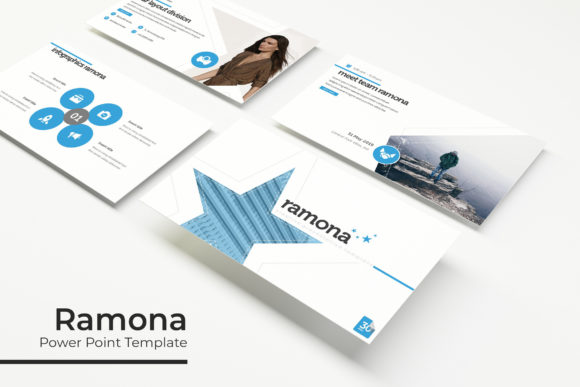
Creating a compelling presentation often feels like a balancing act between aesthetic appeal and clear communication. The Ramona Power Point Template addresses this challenge by providing a structured yet flexible foundation for visual storytelling. Rather than forcing users to build layouts from scratch, this collection offers 150 total slides organized into five distinct premade color themes. With 30 slides dedicated to each color variation, the template serves as a comprehensive toolkit for anyone needing to convey information effectively without spending hours on graphic design.
What sets Ramona apart is its focus on usability across different experience levels. It includes handcrafted infographics, section break slides, and gallery layouts that are fully resizable and editable. Because the graphics are based on master slides and feature pixel-perfect illustrations, users can maintain visual consistency even when customizing content. Whether you are preparing a quarterly business review or a classroom lesson plan, the template provides the structural elements necessary to keep an audience engaged while allowing enough creative freedom to make the presentation your own.
Why Visual Structure Matters Differently Across Audiences
A single design resource rarely serves every user in the exact same way. While the core features of the Ramona Power Point Template remain constant, the value proposition shifts depending on who is using it and what they aim to achieve. Understanding these nuances helps potential users determine if this specific toolkit aligns with their current workflow and long-term goals.
For Beginners and Students: Reducing the Learning Curve
If you have limited design experience, staring at a blank slide can be paralyzing. Beginners often struggle not with the content itself, but with how to arrange it visually. For this group, Ramona acts as an educational scaffold. The inclusion of picture placeholders with drag-and-drop functionality removes the technical friction of formatting images. Instead of wrestling with alignment tools or aspect ratios, new users can simply drop their photos into pre-designed frames.
This demographic also benefits significantly from the "Readme First" file and free font download links. These small details prevent common frustrations where a downloaded template looks broken due to missing assets. By ensuring all typography is accessible and free, beginners can replicate the professional look of the preview without hidden costs or licensing confusion. The 30 slides per color theme provide enough variety to learn different layout principles—such as hierarchy and whitespace—without overwhelming them with excessive options.
Professionals and Marketers: Speed and Brand Consistency
For entrepreneurs, marketers, and corporate professionals, time is often the most critical constraint. These users typically know what they want to say but lack the hours required to design custom infographics for every data point. The handcrafted infographic slides in Ramona allow professionals to visualize complex data quickly. Because these graphics are vector-based and editable within PowerPoint, they can be adjusted to match specific brand colors or updated with real-time metrics without losing quality.
The five premade color variations serve a strategic purpose here. A marketing agency might use one palette for client pitches and another for internal reporting, maintaining distinction without creating new masters. Business owners evaluating this template should consider the commercial value of having a reusable asset. Unlike hiring a designer for a one-off project, owning a versatile template like Ramona allows for rapid iteration on pitch decks, portfolios, and sales presentations over the long term.
Educators and Creators: Engagement Through Variety
Teachers, trainers, and content creators face a unique challenge: keeping audiences attentive over longer periods. The sheer volume of 150 slides supports this need by preventing visual fatigue. When every slide looks identical, attention drifts. Ramona’s dedicated section break slides act as visual palate cleansers, signaling transitions between topics and helping learners mentally organize information.
Creators and hobbyists may prioritize the portfolio and gallery slides. These layouts are designed to showcase visual work rather than text, making them ideal for photographers, artists, or bloggers presenting case studies. The pixel-perfect illustrations ensure that the decorative elements enhance rather than distract from the featured work. For educators, the ability to edit these layouts means they can adapt the same template for different subjects or grade levels, maximizing the return on their initial setup time.
Evaluating Practical Features Against Your Needs
Before integrating any template into your workflow, it is helpful to assess specific features against your actual requirements. Not every user needs every component, but knowing what is available prevents future bottlenecks.
- Master Slide Architecture: If you frequently update logos or contact information across multiple decks, verify that the template utilizes master slides correctly. Ramona’s reliance on master slides ensures that global changes propagate instantly, saving significant editing time.
- Widescreen Compatibility: Modern displays and projectors predominantly use 16:9 aspect ratios. The inclusion of 5 PPTX widescreen files ensures your presentation won’t appear stretched or pixelated on current hardware. Users presenting on older 4:3 equipment still have standard format options available.
- Editability vs. Static Images: Some templates use flattened images for infographics, which cannot be changed. Ramona offers fully editable graphics. If your data changes monthly or you need to translate text within charts, this editability is non-negotiable.
- Asset Clarity: Always note that preview photographs are for illustration only. This transparency helps users avoid copyright issues. You must supply your own imagery, so ensure you have access to stock photos or original content before starting.
Making the Right Choice for Your Project
Determining whether the Ramona Power Point Template fits your needs requires honest self-assessment regarding your skill level and project scope. If you are looking for a completely automated solution that generates content for you, this template will not meet expectations; it is a design framework, not a content generator. However, if you have solid content and need a reliable, professional vessel to carry it, Ramona offers substantial utility.
Consider the longevity of your presentation needs. For a one-time event, a simpler free template might suffice. But for users who present regularly—whether pitching to investors, teaching semester-long courses, or showcasing freelance portfolios—the investment in a comprehensive system pays dividends through consistency and efficiency. The combination of 150 slides, diverse color palettes, and technical reliability makes it a practical choice for those who view presentations as a recurring part of their professional or creative life.
Ultimately, the best template is one that disappears into the background, allowing your message to take center stage. Ramona facilitates this by handling the heavy lifting of layout and aesthetics. By leveraging its drag-and-drop placeholders, editable vectors, and thoughtful organization, users across the spectrum can produce polished results that respect both their time and their audience's attention.