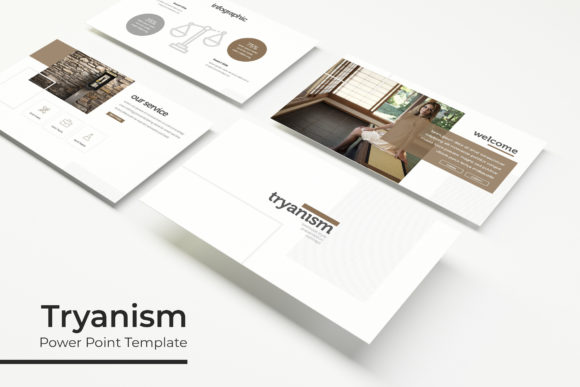
Tryanism Power Point Template: Design Made Simple
Creating a professional presentation often feels like a balancing act between compelling content and attractive design. For many entrepreneurs, educators, and marketers, the visual aspect of a slide deck can become a significant bottleneck. The Tryanism Power Point Template addresses this challenge by providing a comprehensive, pre-designed framework that allows users to focus on their message rather than pixel-pushing. At its core, this resource is a collection of 150 total slides organized into five distinct color themes, offering enough variety to handle multiple projects without requiring advanced graphic design skills.
The primary appeal of this template lies in its practical structure. Instead of a single monolithic file, the package includes five separate PPTX files. Each file contains 30 unique slides based on a specific premade color palette. This modular approach is incredibly useful for busy professionals who need to maintain brand consistency across different departments or client pitches. Whether you are preparing a quarterly business review, a creative portfolio, or an educational workshop, having thirty dedicated layouts per color variation ensures you have the right visual tool for every section of your narrative.
Streamlining Workflow with Master Slides and Placeholders
One of the most frustrating aspects of using generic templates is the inability to make global changes quickly. Tryanism solves this through its robust use of Master Slides. Because the graphics and layout elements are anchored to the master, you can adjust fonts, logos, or background elements across multiple slides simultaneously. This feature is particularly valuable for small business owners and freelancers who may not have a dedicated design team but still need to produce polished materials efficiently.
The template also emphasizes ease of use through resizable and editable graphic picture placeholders. These are designed with a drag-and-drop functionality that respects the original composition of the slide. When you insert your own images, they automatically conform to the intended shape and size without distortion. This eliminates the tedious process of cropping and aligning photos manually, ensuring that even beginners can achieve a clean, professional look. The placeholders serve as visual guides, helping users understand where imagery works best to support their text rather than distract from it.
Visual Storytelling Through Handcrafted Infographics
Data visualization is often where presentations fail. Complex information can easily overwhelm an audience if not presented clearly. This template includes handcrafted infographics specifically built within PowerPoint. Unlike static images imported from external software, these graphics are fully editable vector shapes. You can change colors, adjust values, and modify labels directly in the application. This flexibility allows marketers and analysts to customize data representations to match their specific findings while maintaining the aesthetic integrity of the overall deck.
Beyond data, the template provides specialized slides for galleries and portfolios. These layouts are essential for creatives, architects, and product managers who need to showcase visual work. The gallery slides offer various grid arrangements and spotlight formats that let images breathe. Similarly, the section break slides act as visual pauses, helping to guide the audience through different chapters of a presentation. These transitional slides are crucial for maintaining engagement during longer talks, preventing viewer fatigue by signaling a shift in topic or tone.
Practical Applications Across Different Contexts
The versatility of the Tryanism Power Point Template makes it suitable for a wide range of users. Educators can utilize the infographic and section break slides to create structured lesson plans that keep students engaged. The five color variations allow teachers to color-code different subjects or units, making digital resources easier to navigate. For corporate trainers, the widescreen format ensures that content displays correctly on modern conference room screens and virtual meeting platforms alike.
Entrepreneurs and startup founders will find immense value in the portfolio and gallery sections when pitching to investors or clients. A cohesive visual identity builds trust, and having five premade color options means you can tailor the mood of the presentation to the specific audience. A tech startup might choose a cooler, more analytical palette, while a lifestyle brand could opt for warmer tones. The ability to switch between these complete sets without losing layout consistency saves hours of reformatting time.
- Business Proposals: Use the structured layouts to present services, pricing, and timelines clearly.
- Educational Content: Leverage infographics to simplify complex theories or historical timelines.
- Creative Portfolios: Showcase photography, design work, or products using dedicated gallery slides.
- Internal Reporting: Standardize team updates with consistent section breaks and data visuals.
- Webinars and Workshops: Maintain viewer interest with varied slide types and professional aesthetics.
Understanding What Is Included and Technical Specs
Before integrating this template into your workflow, it is important to understand exactly what the package delivers. The download includes five PPTX files in standard format and five corresponding widescreen versions. This dual-format inclusion is critical for modern compatibility, ensuring your slides look sharp whether projected on an older 4:3 screen or displayed on a contemporary 16:9 monitor. Additionally, a Readme First file is provided, which serves as a quick-start guide to help you locate assets and understand the file structure.
Typography plays a significant role in the template's polished appearance. To ensure you can replicate the preview look exactly, a free font download link is included. Using the recommended typeface guarantees that spacing and hierarchy remain intact. However, because the text boxes are standard, you can easily substitute your own brand fonts if necessary. The pixel-perfect illustrations included in the deck are designed to scale without losing quality, which is vital when resizing slides or exporting to PDF.
Important Considerations Before You Begin
While the Tryanism Power Point Template is designed for accessibility, there are practical considerations to keep in mind. Prospective users should note that all photographs or pictures used in the preview are not included. They are intended solely for illustration purposes to demonstrate how the layouts function. You will need to source your own high-quality imagery to populate the placeholders. This is actually a benefit in disguise, as it prevents your presentation from looking identical to others who might use the same template.
Additionally, while the template is beginner-friendly, taking a few minutes to explore the Master Slide view will significantly enhance your efficiency. Understanding how the parent layouts control child slides will prevent accidental formatting errors. Users should also verify that their version of PowerPoint supports the specific vector features used in the handcrafted infographics. While compatible with most modern versions, older software may occasionally interpret complex editable shapes differently.
Ultimately, this template serves as a foundation rather than a finished product. Its value comes from the time it saves and the professional standard it establishes. By providing 150 slides across five cohesive color systems, it removes the paralysis of the blank canvas. Whether you are a freelancer building a personal brand or a corporate trainer developing new curriculum, the structural integrity and visual flexibility of this resource allow you to communicate your ideas with confidence and clarity. The combination of technical precision and aesthetic variety makes it a reliable tool for anyone looking to elevate their presentation game without hiring a designer.